Build Trace #2
shippedReliable Browser Workflow Replay test
test
Demo
Watch the workflow replay
Demo summary
test
What to watch for
- test
Problem
The production problem
An h1 header
Paragraphs are separated by a blank line.
2nd paragraph. Italic, bold, and monospace. Itemized lists
look like:
- this one
- that one
- the other one
Note that --- not considering the asterisk --- the actual text content starts at 4-columns in.
Block quotes are written like so.
They can span multiple paragraphs, if you like.
Use 3 dashes for an em-dash. Use 2 dashes for ranges (ex., "it's all in chapters 12--14"). Three dots ... will be converted to an ellipsis. Unicode is supported. ☺
An h2 header
Here's a numbered list:
- first item
- second item
- third item
Note again how the actual text starts at 4 columns in (4 characters from the left side). Here's a code sample:
# Let me re-iterate ...
for i in 1 .. 10 { do-something(i) }
As you probably guessed, indented 4 spaces. By the way, instead of indenting the block, you can use delimited blocks, if you like:
define foobar() {
    print "Welcome to flavor country!";
}
(which makes copying & pasting easier). You can optionally mark the delimited block for Pandoc to syntax highlight it:
import time
# Quick, count to ten!
for i in range(10):
    # (but not *too* quick)
    time.sleep(0.5)
    print i
An h3 header
Now a nested list:
-
First, get these ingredients:
- carrots
- celery
- lentils
-
Boil some water.
-
Dump everything in the pot and follow this algorithm:
find wooden spoon
uncover pot
stir
cover pot
balance wooden spoon precariously on pot handle
wait 10 minutes
goto first step (or shut off burner when done)
Do not bump wooden spoon or it will fall.
Notice again how text always lines up on 4-space indents (including that last line which continues item 3 above).
Here's a link to a website, to a local doc, and to a section heading in the current doc. Here's a footnote 1.
Tables can look like this:
size material color
9 leather brown 10 hemp canvas natural 11 glass transparent
Table: Shoes, their sizes, and what they're made of
(The above is the caption for the table.) Pandoc also supports multi-line tables:
keyword text
red Sunsets, apples, and other red or reddish things.
green Leaves, grass, frogs and other things it's not easy being.
A horizontal rule follows.
Here's a definition list:
apples : Good for making applesauce. oranges : Citrus! tomatoes : There's no "e" in tomatoe.
Again, text is indented 4 spaces. (Put a blank line between each term/definition pair to spread things out more.)
Here's a "line block":
| Line one | Line too | Line tree
and images can be specified like so:

Inline math equations go in like so: $\omega = d\phi / dt$. Display math should get its own line and be put in in double-dollarsigns:
$$I = \int \rho R^{2} dV$$
And note that you can backslash-escape any punctuation characters which you wish to be displayed literally, ex.: `foo`, *bar*, etc.
Footnotes
-
Footnote text goes here. ↩
What I built
The concrete system
AgentFlow-Pro
Process-supervised reinforcement learning for a multi-step reasoning agent.
A from-scratch rebuild of AgentFlow (ICLR 2026) that replaces the paper's outcome-only Flow-GRPO with a step-level Process Reward Model (PRM) and DAPO (Decoupled Clip + Dynamic Sampling Policy Optimization). The agent is a Planner → Executor → Verifier loop; only the Planner is trained, and it is trained to make better individual decisions, not just to land more correct final answers.






The thesis
Outcome-only RL (GRPO / Flow-GRPO) gives an agent one scalar of feedback per trajectory — did the
final answer match? On a single-shot task that is fine. On a multi-step agentic loop it is a blunt
instrument: a five-step trajectory that succeeded propagates the same gradient to a brilliant
opening search and a wasteful think-loop in the middle. There is no notion of which step was the
good move. Long trajectories dilute the signal across many tokens, and any prompt where all rollouts
agree (all right or all wrong) contributes zero gradient while still costing a full set of
rollouts.
AgentFlow-Pro attacks both problems directly:
- A learned Process Reward Model scores every Planner decision on a 0–1 quality scale, so the policy gets a dense, per-step signal instead of one trajectory-level bit.
- DAPO decouples the PPO clip bounds (lets clearly-good actions take a larger step), uses a token-level loss (a long trajectory no longer gets down-weighted into noise), filters overlong stalls, and — via a hand-built dynamic-sampling pass — drops zero-variance prompt groups so every optimizer step carries real signal.
The result is a credit-assignment story you can point at: this action was good, that one stalled, and the gradient reflects it.
Architecture
              ┌───────────┐  next action   ┌───────────┐  result   ┌───────────┐  sufficient?
   query ───► │  Planner  │ ─────────────► │ Executor  │ ────────► │ Verifier  │ ──► answer ✔
              │(trainable)│                │  (tools)  │           │  (judge)  │ ──► loop ↺
              └─────▲─────┘                └───────────┘           └─────┬─────┘
                    │                                                   │
                    └───────────────  Memory (running state)  ◄──────────┘
                          loop runs up to max_steps, else a fallback answer
- Planner (
core/planner.py) — the only trainable module. Emits a grammar-constrained{thought, action, action_input}JSON each step;action ∈ {think, search, code, answer}. - Executor (
core/executor.py) — pure dispatch, no LLM call:search→ Tavily,code→ a sandboxed Python REPL,think/answer→ echo. - Verifier (
core/verifier.py) — a separate judge that decides whether the running state is enough to answer or the loop should continue. Conservative by default (parse failure ⇒ keep going). - Memory (
core/memory.py) — in-task running state today; a Qdrant cross-episode backend sits behind the same interface as a planned extension.
The loop, module contracts, and tool internals are documented in docs/architecture.md.
What changes vs. the paper
| AgentFlow (paper) | AgentFlow-Pro | |
|---|---|---|
| Backbone | Qwen2.5-7B | Qwen3-8B (bf16 + LoRA via PEFT) |
| RL algorithm | Flow-GRPO (outcome reward) | DAPO — decoupled clip + dynamic sampling |
| Credit assignment | trajectory-level | + step-level, via a learned PRM |
| Reward model | — | Qwen3-0.6B regression head, trained on LLM-judge labels |
| Tool layer | bespoke | FastMCP server + sandboxed Python exec |
| LLM serving | — | Ollama native /api/chat (see Engineering below) |
| Memory | in-task | in-task + Qdrant cross-episode retrieval (--memory) |
Full design + the experimental protocol: docs/research.md.
Contribution 1 — DAPO, component by component
DAPO is four techniques on top of GRPO. TRL 1.4's GRPOTrainer
(loss_type="dapo") implements four of the five pieces I needed; the fifth is mine. Here is
exactly where each piece comes from:
| DAPO component | Where it comes from |
|---|---|
| Clip-higher (decoupled clip) | TRL — epsilon=0.2, epsilon_high=0.28 |
| Token-level policy-gradient loss | TRL — loss_type="dapo" |
| Overlong filtering | TRL — mask_truncated_completions=True |
| Soft overlong punishment | TRL — get_soft_overlong_punishment(...) |
| Dynamic sampling | train/dynamic_sampling.py — TRL does not implement it |
Dynamic sampling (curate_prompts, has_signal) is the piece I built. Before training, each
candidate prompt is rolled out G times and scored by the PRM; any prompt whose G rewards have
~zero variance (pstdev < 1e-3) produces zero advantage on every token — a wasted rollout — and is
dropped. What survives is a dataset of informative states where the policy can actually learn the
difference between a good action and a bad one. The trainer wiring (loss_type="dapo", beta=0.0
for the KL-free DAPO objective, clip-higher, overlong handling) lives in train/dapo.py.
Contribution 2 — a learned Process Reward Model
The headline research piece. Instead of hand-tuned heuristic step rewards, the PRM is a trained model that learns what a good Planner decision looks like.
Pipeline (train/judge.py → train/prm.py → train/reward.py):
- Collect trajectories by running the untrained agent over the AIME training split, dumping full
step-by-step traces (
eval/run.py --benchmark aime_train). - Label every step with an LLM judge (
train/judge.py). The judge is DeepSeek (deepseek-chat), deliberately stronger than the 8B policy it supervises — the standard distillation/RLHF principle that your reward signal should come from a more capable model. It rates each step 0–1 on a calibrated rubric. One-shot, cheap (well under $1). - Train a Qwen3-0.6B sequence-regression head (
num_labels=1, MSE) on those labels (train/prm.py). MAE on a held-out split is the convergence check. - Reward at training time (
train/reward.py): the PRM scores each generated Planner action. Malformed JSON / unknown action ⇒0.0; otherwise the PRM's[0,1]score is the reward. The live RL signal is the PRM, not DeepSeek — the judge is used exactly once, to build the dataset.
A detail I care about: build_prm_input (train/data.py) is the single source of truth for the
text the PRM scores, shared by the labeler, the trainer, and the reward function so they can never
drift. It deliberately excludes the tool result — the PRM rates the decision, which is the thing
being optimized, not the environment's response to it.
The deployed agent stays 100% Qwen3-8B. DeepSeek never runs at inference or in the RL loop.
Engineering highlights
The kind of thing that doesn't show up in a results table but is most of the actual work:
- A 53× serving fix. Ollama's OpenAI-compatible
/v1endpoint silently ignoresthink: false— Qwen3 kept emitting reasoning tokens until it burned the entire budget and returned empty content, so every structured call failed to parse, retried, and degraded. The native/api/chatendpoint honors it. A trivial two-step query went from 11m27s → ~13s. The whole LLM layer (core/llm.py) is built on the native endpoint as a result. - Grammar-constrained structured output. Planner/Verifier pass a Pydantic
model_json_schema()straight to Ollama'sformatfield, so every required field is grammar-guaranteed — no more missing-field crashes — backed by a retry-once-then-degrade fallback that never raises. - A sandboxed Python REPL (
tools/builtin/python_exec.py) with a stdlib whitelist (sympy/numpy/mpmathallowed because AIME needs symbolic math), auto-printing of a bare final expression, and a lenient parser that tolerates the stray indentation small models emit. Not a hardened security boundary — documented as such. - Leakage-free evaluation. Training data is
di-zhang-fdu/AIME_1983_2024filtered to Year ≤ 2023 (918 problems), explicitly de-duplicated against the AIME 2024 test set. The model is never trained on what it is scored on. - A Python-3.14
dill/datasetsincompatibility worked around with a targeted monkey-patch so caching doesn't break on the dev box.
Results
Before/after, same harness, same Q4_K_M quantization — the only variable is the PRM-guided
DAPO training. Full per-problem trajectories and the curated reports live in
results/.
| Model | Benchmark | Accuracy | Avg steps | Notes |
|---|---|---|---|---|
qwen3:8b (untrained) | AIME 2024 (30) | 33.3% (10/30) | 4.03 | baseline; think off, temp=0, verified |
qwen3:8b + DAPO + PRM | AIME 2024 (30) | 30.0% (9/30) | 4.37 | flat within noise (n=30, ±~17pt CI; 11/30 flipped: +5/−6) |
qwen3:8b (untrained) | GPQA Diamond (100) | 40.0% (40/100) | 3.09 | baseline |
qwen3:8b + DAPO + PRM | GPQA Diamond (100) | 45.0% (45/100) | 3.19 | +5.0 pts — cross-domain (trained on AIME math) |
What this shows. A learned PRM driving DAPO (with hand-built dynamic sampling) trained
end-to-end and produced a +5.0 pt cross-domain gain on GPQA (n=100, the reliable test) from a
Planner trained only on AIME math. On AIME24 the result is flat within noise — at n=30 the
95% CI is ≈±17 pts, and the policy in fact changed a lot (11 of 30 problems flipped, net −1), i.e.
small-sample variance rather than a regression. The trained Planner also reasons more deliberately
(avg steps ↑), the expected signature of a process reward. This is a deliberately minimal demo
(300 LoRA steps, 8B); it validates the method, not a leaderboard push — see
results/README.md and docs/research.md for the full
analysis and the levers for larger gains (more steps, stronger PRM, outcome-reward mixing, vLLM,
bigger policy).
The training pipeline (Phase 4)
Everything below is built and committed; it runs as one session on a rented 24–48 GB GPU
(A40 recommended, **$8–15 total**). Step-by-step infra guide:
docs/phase4-runpod-guide.md.
# on the GPU box, after `uv sync --extra rl --extra eval`
uv run python -m eval.run --benchmark aime_train --limit 150 --max-steps 6   # 1. collect trajectories
uv run python -m train.judge --runs "runs/eval_aime_train_*.json"            # 2. LLM-judge labels (DeepSeek)
uv run python -m train.prm   train --labels artifacts/prm_labels.jsonl       # 3. train the PRM
uv run python -m train.dapo  --prm artifacts/prm --runs "runs/eval_aime_train_*.json"   # 4. DAPO-train the Planner
# 5. export to GGUF, load into Ollama, re-run the eval for the "after" numbers
Quickstart
Requires Python 3.11, uv, and a running Ollama.
uv sync
ollama pull qwen3:8b

uv run python main.py "What is 15% of 240, then doubled?"
uv run python main.py "Explain how transformers work" --max-steps 3
uv run python main.py "..." --think          # enable Qwen3 reasoning tokens (slower, default off)
Web search uses Tavily — put TAVILY_API_KEY=... in .env
(copy .env.example).
Evaluation
uv sync --extra eval
uv run python -m eval.run -b aime24 --limit 5 --max-steps 8    # small subset first
uv run python -m eval.run -b aime24                            # full AIME24 (30)
uv run python -m eval.run -b gpqa  --limit 5 --max-steps 6     # GPQA Diamond (gated; HF_TOKEN)
Repo map
| Path | What |
|---|---|
core/ | the inference engine — llm (native-Ollama client), types (Pydantic models), memory, planner, executor, verifier, solver |
tools/ | mcp_server.py (FastMCP), builtin/search.py (Tavily), builtin/python_exec.py (sandboxed REPL) |
eval/ | datasets.py (AIME24 / GPQA / AIME-train loaders), scorer.py (math-verify + MC), runner.py, run.py (CLI) |
train/ | the RL stack — data.py (shared plumbing), judge.py (LLM-judge labeling), prm.py (learned PRM), reward.py (PRM→reward), dynamic_sampling.py (the DAPO piece TRL lacks), dapo.py (trainer) |
docs/ | architecture.md, research.md (the DAPO + PRM design), phase4-runpod-guide.md |
main.py | the solve CLI |
runs/ | eval reports (gitignored) |
Contributors / agents: start with AGENTS.md; the phased plan and status live in ROADMAP.md.
Status
Scaffold · core loop · real tools · eval harness · the full DAPO + PRM training pipeline are
built and committed, and the Phase 4 GPU run is complete (collect → judge → train PRM → DAPO →
GGUF → re-eval). Both baselines and trained-model numbers are recorded above: GPQA +5.0 pts
(cross-domain), AIME24 flat within noise. See results/ for the full analysis.
References
- AgentFlow — arXiv 2510.05592
- DAPO — arXiv 2503.14476
- TRL
GRPOTrainer— huggingface.co/docs/trl · PEFT — huggingface.co/docs/peft
License
MIT. Built on the ideas of the AgentFlow paper; not affiliated with its authors.
Architecture
System shape and data flow
Orchflow




Orchflow is a lightweight Python framework for readable multi-agent pipelines. It gives you sequential, parallel, conditional, retryable, and observable orchestration, with lightweight human review and JSON resume, without forcing every workflow into a heavy graph runtime.
Video Demo
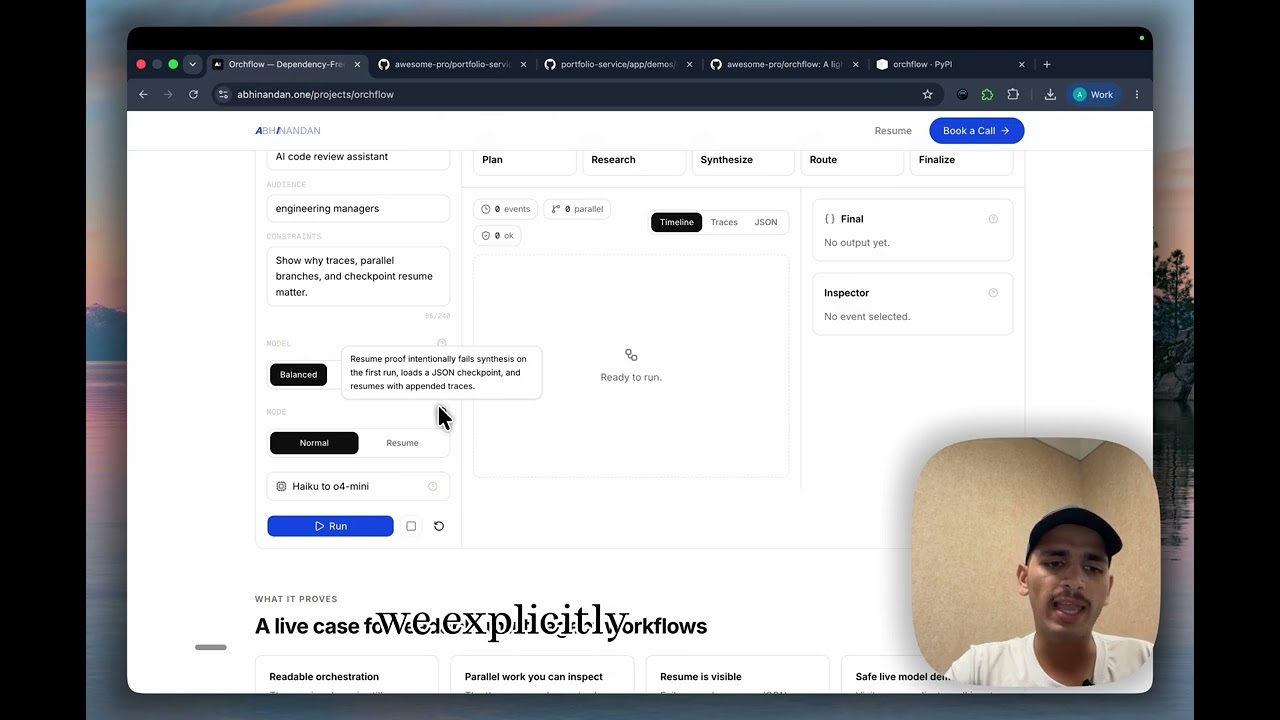
Watch the walkthrough to see Orchflow used as a real multi-agent launch-brief pipeline: readable Python steps, parallel research branches, retries, live events, traces, JSON checkpoints, and resume after failure.
pip install orchflow
Build a readable workflow with normal Python functions, then let Orchflow handle parallel execution, routing, retries, checkpointing, and traces.
import asyncio

from orchflow import Flow, JsonCheckpointStore, StepContext, condition, step


@step(name="plan", retry=2)
async def plan(input: str, context: StepContext) -> dict[str, str]:
    context.state["topic"] = input
    return {
        "topic": input,
        "audience": "AI engineering teams",
    }


@step(name="research_docs")
async def research_docs(input: str, context: StepContext) -> str:
    return "Orchflow supports retries, traces, events, and JSON resume."


@step(name="research_market")
async def research_market(input: str, context: StepContext) -> str:
    return "Teams want agent workflows without modeling everything as a graph."


@step(name="synthesize")
async def synthesize(input: str, context: StepContext) -> str:
    research = context.previous
    draft = (
        f"{context.state['topic']}: "
        f"{research['research_docs']} "
        f"{research['research_market']}"
    )
    context.state["draft"] = draft
    return draft


@step(name="publish")
async def publish(input: str, context: StepContext) -> str:
    return f"Published: {context.previous}"


@step(name="revise")
async def revise(input: str, context: StepContext) -> str:
    return f"Needs revision: {context.previous}"


async def main() -> None:
    flow = Flow(
        [
            plan,
            [research_docs, research_market],
            synthesize,
            condition(
                when=lambda ctx: len(str(ctx.previous)) <= 240,
                then=publish,
                otherwise=revise,
            ),
        ],
        name="launch-note",
    )

    result = await flow.run(
        "Orchflow v0.5 release",
        checkpoint=JsonCheckpointStore("orchflow-checkpoint.json"),
    )

    print(result.output)
    print([trace.step_name for trace in result.traces])


asyncio.run(main())
Why Orchflow Exists
Plain Python function chaining is easy to read, but it becomes fragile as soon as a workflow needs retries, parallel work, branching, shared state, or traces. Large graph frameworks are powerful, but they can add more abstraction than a small agent pipeline needs.
Orchflow sits in the middle: the user writes normal Python functions, while the framework handles orchestration mechanics that should be reliable and inspectable.
flowchart LR
    A["flow.run(input)"] --> B["Step: research"]
    B --> C{"Parallel group"}
    C --> D["Step: web_research"]
    C --> E["Step: docs_research"]
    D --> F["Merge outputs"]
    E --> F
    F --> G{"Condition"}
    G --> H["technical_writer"]
    G --> I["general_writer"]
    H --> J["FlowResult + traces"]
    I --> J

What It Demonstrates
Orchflow is intentionally small, but it is built like a real package:
- Async-first execution with sync-step support through worker threads
- Sequential pipelines, parallel fan-out, and conditional routing
- Retry policy at both flow and step level
- Shared run state with explicit
StepContext - Flat
StepTracerecords for every attempt, including failures - Live lifecycle events with
Flow.events(...) - Lightweight human input gates with callback or stdin providers
- JSON checkpoints and resume for practical long-running workflows
- Optional LiteLLM-backed
Agentwithout making LiteLLM a core dependency - Structured agent outputs with JSON schema or optional Pydantic models
- Offline test helpers under
orchflow.testing - Typed package metadata, CI, TestPyPI/PyPI release workflows, and tag releases
Core Concepts
Orchflow keeps the public model deliberately small.
| Concept | Purpose |
|---|---|
Agent | Stateless role-based LLM helper with optional LiteLLM support |
AgentConfig | Typed provider configuration for Agent calls |
@step | Decorator for a unit of workflow work |
StepContext | Carries previous output, original input, metadata, and shared state |
Flow | Orchestrates sequential, parallel, and conditional execution |
FlowResult | Final output, traces, state, timing, and failure details |
FlowEvent | Live lifecycle event emitted while a flow runs |
human_input | Step helper for pausing a flow and collecting reviewer text |
JsonCheckpointStore | Local JSON checkpoint store for resume |
Sequential Flow
from orchflow import Flow, StepContext, step


@step(name="research", retry=2)
async def research(input: str, context: StepContext) -> str:
    return f"notes about {input}"


@step(name="draft")
async def draft(input: str, context: StepContext) -> str:
    return f"article based on {context.previous}"


result = await Flow([research, draft], name="content-pipeline").run(
    "AI agent orchestration"
)

print(result.output)
print([trace.step_name for trace in result.traces])
Important data-flow rule: the first input argument is always the original
flow.run(...) input. Previous step output is available as context.previous.
Parallel Flow
Wrap independent steps in a list to run them concurrently.
flow = Flow([
    plan,
    [web_research, docs_research],
    synthesize,
])

result = await flow.run("workflow frameworks")
The next step receives a dictionary keyed by step name:
{
    "web_research": "...",
    "docs_research": "..."
}
Parallel steps produce separate flat trace entries with the same
parallel_group_id.
Conditional Flow
from orchflow import Flow, condition

flow = Flow([
    classify,
    condition(
        when=lambda ctx: ctx.previous == "technical",
        then=technical_writer,
        otherwise=general_writer,
    ),
])
The predicate receives the current StepContext, so routing can use
context.previous, shared state, or run metadata.
Human Review
Use human_input(...) when a pipeline needs a lightweight review point without
adding checkpointing, queues, or a separate UI.
from orchflow import Flow, StepContext, condition, human_input, step


@step
async def draft(input: str, context: StepContext) -> str:
    text = f"Draft about {input}"
    context.state["draft"] = text
    return text


review = human_input(
    lambda ctx: f"Review this draft:\n{ctx.previous}\n\nDecision: ",
    name="human_review",
)


@step
async def publish(input: str, context: StepContext) -> str:
    return f"Published: {context.state['draft']}"


@step
async def revise(input: str, context: StepContext) -> str:
    return f"Revision requested: {context.previous}"


flow = Flow([
    draft,
    review,
    condition(
        when=lambda ctx: str(ctx.previous).strip().lower() == "approve",
        then=publish,
        otherwise=revise,
    ),
])
By default, human_input(...) reads from stdin. Applications and tests can pass
a sync or async provider(prompt, context) callback instead. The human response
is normal step output, so it is available as context.previous to the next step.
Checkpoint And Resume
Use JsonCheckpointStore when a flow should survive a transient failure without
rerunning completed top-level work.
from orchflow import Flow, JsonCheckpointStore

store = JsonCheckpointStore("orchflow-checkpoint.json")
flow = Flow([collect, draft, publish], name="checkpointed-pipeline")

first = await flow.run(
    "AI agent orchestration",
    checkpoint=store,
    raise_on_error=False,
)

if not first.success:
    resumed = await flow.resume(store)
    print(resumed.output)
Checkpoints are plain JSON and are saved after each completed top-level item:
single steps, selected condition branches, or complete parallel groups. A failed
parallel group resumes by rerunning the whole group. Successful flows keep the
checkpoint file and mark it completed for inspection.
Live Events
Flow.events(...) lets applications observe a workflow while it runs.
async for event in flow.events("agent observability"):
    print(event.type, event.step_name, event.attempt)
Event types:
flow_startedstep_startedstep_completedstep_failedretry_scheduledflow_completedflow_failedcheckpoint_savedcheckpoint_loaded
Events are orchestration lifecycle events, not token streaming. The final
flow_completed or flow_failed event carries a FlowResult.
Trace Output
Every step attempt creates a flat StepTrace.
result = await flow.run("topic")

for trace in result.traces:
    print(trace.to_dict())
Example shape:
{
    "step_name": "draft",
    "input": "topic",
    "output": "article...",
    "error": None,
    "attempt": 1,
    "parallel_group_id": None,
    "duration_seconds": 0.42,
    "started_at": "2026-05-10T03:13:48.994932+00:00",
    "ended_at": "2026-05-10T03:13:49.414932+00:00",
    "success": True,
}
Optional LLM Agent
Core Orchflow has no runtime dependencies. The public Agent uses LiteLLM only
when you install the optional extra:
pip install "orchflow[litellm]"
from orchflow import Agent

writer = Agent(
    name="writer",
    role="You write concise technical explanations.",
    model="gpt-4o-mini",
)

text = await writer.run("Explain lightweight orchestration")
For structured workflows, use AgentConfig and run_structured(...):
from orchflow import Agent, AgentConfig

extractor = Agent(
    name="extractor",
    role="Extract structured data. Return only JSON.",
    config=AgentConfig(model="gpt-4o-mini", temperature=0),
)

person = await extractor.run_structured(
    "Ada works at OpenAI.",
    schema={
        "title": "person",
        "type": "object",
        "properties": {
            "name": {"type": "string"},
            "company": {"type": "string"},
        },
        "required": ["name", "company"],
    },
)
run_structured(...) returns parsed JSON for schema dictionaries and a Pydantic
model instance when a Pydantic model class is passed. Tool-calling loops, memory,
and durable agent state are intentionally outside the current scope. Orchflow
focuses on orchestration first.
Examples
uv run python examples/basic_sequential.py
uv run python examples/parallel_steps.py
uv run python examples/conditional_flow.py
uv run python examples/live_events.py
uv run python examples/human_review.py
uv run python examples/checkpoint_resume.py
Optional LiteLLM-backed examples after installing orchflow[litellm] and
configuring a provider API key:
uv run python examples/litellm_agent.py
uv run python examples/structured_agent.py
Docs:
Development
uv sync --extra dev
uv run pytest
uv run ruff check
uv run ruff format --check
uv run pyright
uv build
Release Process
TestPyPI publishing is manual through
.github/workflows/publish-testpypi.yml. Real PyPI publishing is tag-based
through .github/workflows/publish-pypi.yml.
git tag -a v0.5.0 -m "Release v0.5.0"
git push origin v0.5.0
The release workflow verifies that the Git tag matches pyproject.toml, uploads
to PyPI through trusted publishing, and creates a GitHub Release.
Roadmap
0.5.x: structured agent polish and docs improvements0.6.0: evaluate one-turn tool execution
Source Of Truth
Project decisions live in AGENTS.md. Implementation follows that document.
Implementation details
Design choices and constraints
Orchflow
Orchflow is a lightweight Python framework for readable multi-agent pipelines. It gives you sequential, parallel, conditional, retryable, and observable orchestration, with lightweight human review and JSON resume, without forcing every workflow into a heavy graph runtime.
Video Demo
Watch the walkthrough to see Orchflow used as a real multi-agent launch-brief pipeline: readable Python steps, parallel research branches, retries, live events, traces, JSON checkpoints, and resume after failure.
pip install orchflow
Build a readable workflow with normal Python functions, then let Orchflow handle parallel execution, routing, retries, checkpointing, and traces.
import asyncio

from orchflow import Flow, JsonCheckpointStore, StepContext, condition, step


@step(name="plan", retry=2)
async def plan(input: str, context: StepContext) -> dict[str, str]:
    context.state["topic"] = input
    return {
        "topic": input,
        "audience": "AI engineering teams",
    }


@step(name="research_docs")
async def research_docs(input: str, context: StepContext) -> str:
    return "Orchflow supports retries, traces, events, and JSON resume."


@step(name="research_market")
async def research_market(input: str, context: StepContext) -> str:
    return "Teams want agent workflows without modeling everything as a graph."


@step(name="synthesize")
async def synthesize(input: str, context: StepContext) -> str:
    research = context.previous
    draft = (
        f"{context.state['topic']}: "
        f"{research['research_docs']} "
        f"{research['research_market']}"
    )
    context.state["draft"] = draft
    return draft


@step(name="publish")
async def publish(input: str, context: StepContext) -> str:
    return f"Published: {context.previous}"


@step(name="revise")
async def revise(input: str, context: StepContext) -> str:
    return f"Needs revision: {context.previous}"


async def main() -> None:
    flow = Flow(
        [
            plan,
            [research_docs, research_market],
            synthesize,
            condition(
                when=lambda ctx: len(str(ctx.previous)) <= 240,
                then=publish,
                otherwise=revise,
            ),
        ],
        name="launch-note",
    )

    result = await flow.run(
        "Orchflow v0.5 release",
        checkpoint=JsonCheckpointStore("orchflow-checkpoint.json"),
    )

    print(result.output)
    print([trace.step_name for trace in result.traces])


asyncio.run(main())
Why Orchflow Exists
Plain Python function chaining is easy to read, but it becomes fragile as soon as a workflow needs retries, parallel work, branching, shared state, or traces. Large graph frameworks are powerful, but they can add more abstraction than a small agent pipeline needs.
Orchflow sits in the middle: the user writes normal Python functions, while the framework handles orchestration mechanics that should be reliable and inspectable.
flowchart LR
    A["flow.run(input)"] --> B["Step: research"]
    B --> C{"Parallel group"}
    C --> D["Step: web_research"]
    C --> E["Step: docs_research"]
    D --> F["Merge outputs"]
    E --> F
    F --> G{"Condition"}
    G --> H["technical_writer"]
    G --> I["general_writer"]
    H --> J["FlowResult + traces"]
    I --> J
What It Demonstrates
Orchflow is intentionally small, but it is built like a real package:
- Async-first execution with sync-step support through worker threads
- Sequential pipelines, parallel fan-out, and conditional routing
- Retry policy at both flow and step level
- Shared run state with explicit
StepContext - Flat
StepTracerecords for every attempt, including failures - Live lifecycle events with
Flow.events(...) - Lightweight human input gates with callback or stdin providers
- JSON checkpoints and resume for practical long-running workflows
- Optional LiteLLM-backed
Agentwithout making LiteLLM a core dependency - Structured agent outputs with JSON schema or optional Pydantic models
- Offline test helpers under
orchflow.testing - Typed package metadata, CI, TestPyPI/PyPI release workflows, and tag releases
Core Concepts
Orchflow keeps the public model deliberately small.
| Concept | Purpose |
|---|---|
Agent | Stateless role-based LLM helper with optional LiteLLM support |
AgentConfig | Typed provider configuration for Agent calls |
@step | Decorator for a unit of workflow work |
StepContext | Carries previous output, original input, metadata, and shared state |
Flow | Orchestrates sequential, parallel, and conditional execution |
FlowResult | Final output, traces, state, timing, and failure details |
FlowEvent | Live lifecycle event emitted while a flow runs |
human_input | Step helper for pausing a flow and collecting reviewer text |
JsonCheckpointStore | Local JSON checkpoint store for resume |
Sequential Flow
from orchflow import Flow, StepContext, step


@step(name="research", retry=2)
async def research(input: str, context: StepContext) -> str:
    return f"notes about {input}"


@step(name="draft")
async def draft(input: str, context: StepContext) -> str:
    return f"article based on {context.previous}"


result = await Flow([research, draft], name="content-pipeline").run(
    "AI agent orchestration"
)

print(result.output)
print([trace.step_name for trace in result.traces])
Important data-flow rule: the first input argument is always the original
flow.run(...) input. Previous step output is available as context.previous.
Parallel Flow
Wrap independent steps in a list to run them concurrently.
flow = Flow([
    plan,
    [web_research, docs_research],
    synthesize,
])

result = await flow.run("workflow frameworks")
The next step receives a dictionary keyed by step name:
{
    "web_research": "...",
    "docs_research": "..."
}
Parallel steps produce separate flat trace entries with the same
parallel_group_id.
Conditional Flow
from orchflow import Flow, condition

flow = Flow([
    classify,
    condition(
        when=lambda ctx: ctx.previous == "technical",
        then=technical_writer,
        otherwise=general_writer,
    ),
])
The predicate receives the current StepContext, so routing can use
context.previous, shared state, or run metadata.
Human Review
Use human_input(...) when a pipeline needs a lightweight review point without
adding checkpointing, queues, or a separate UI.
from orchflow import Flow, StepContext, condition, human_input, step


@step
async def draft(input: str, context: StepContext) -> str:
    text = f"Draft about {input}"
    context.state["draft"] = text
    return text


review = human_input(
    lambda ctx: f"Review this draft:\n{ctx.previous}\n\nDecision: ",
    name="human_review",
)


@step
async def publish(input: str, context: StepContext) -> str:
    return f"Published: {context.state['draft']}"


@step
async def revise(input: str, context: StepContext) -> str:
    return f"Revision requested: {context.previous}"


flow = Flow([
    draft,
    review,
    condition(
        when=lambda ctx: str(ctx.previous).strip().lower() == "approve",
        then=publish,
        otherwise=revise,
    ),
])
By default, human_input(...) reads from stdin. Applications and tests can pass
a sync or async provider(prompt, context) callback instead. The human response
is normal step output, so it is available as context.previous to the next step.
Checkpoint And Resume
Use JsonCheckpointStore when a flow should survive a transient failure without
rerunning completed top-level work.
from orchflow import Flow, JsonCheckpointStore

store = JsonCheckpointStore("orchflow-checkpoint.json")
flow = Flow([collect, draft, publish], name="checkpointed-pipeline")

first = await flow.run(
    "AI agent orchestration",
    checkpoint=store,
    raise_on_error=False,
)

if not first.success:
    resumed = await flow.resume(store)
    print(resumed.output)
Checkpoints are plain JSON and are saved after each completed top-level item:
single steps, selected condition branches, or complete parallel groups. A failed
parallel group resumes by rerunning the whole group. Successful flows keep the
checkpoint file and mark it completed for inspection.
Live Events
Flow.events(...) lets applications observe a workflow while it runs.
async for event in flow.events("agent observability"):
    print(event.type, event.step_name, event.attempt)
Event types:
flow_startedstep_startedstep_completedstep_failedretry_scheduledflow_completedflow_failedcheckpoint_savedcheckpoint_loaded
Events are orchestration lifecycle events, not token streaming. The final
flow_completed or flow_failed event carries a FlowResult.
Trace Output
Every step attempt creates a flat StepTrace.
result = await flow.run("topic")

for trace in result.traces:
    print(trace.to_dict())
Example shape:
{
    "step_name": "draft",
    "input": "topic",
    "output": "article...",
    "error": None,
    "attempt": 1,
    "parallel_group_id": None,
    "duration_seconds": 0.42,
    "started_at": "2026-05-10T03:13:48.994932+00:00",
    "ended_at": "2026-05-10T03:13:49.414932+00:00",
    "success": True,
}
Optional LLM Agent
Core Orchflow has no runtime dependencies. The public Agent uses LiteLLM only
when you install the optional extra:
pip install "orchflow[litellm]"
from orchflow import Agent

writer = Agent(
    name="writer",
    role="You write concise technical explanations.",
    model="gpt-4o-mini",
)

text = await writer.run("Explain lightweight orchestration")
For structured workflows, use AgentConfig and run_structured(...):
from orchflow import Agent, AgentConfig

extractor = Agent(
    name="extractor",
    role="Extract structured data. Return only JSON.",
    config=AgentConfig(model="gpt-4o-mini", temperature=0),
)

person = await extractor.run_structured(
    "Ada works at OpenAI.",
    schema={
        "title": "person",
        "type": "object",
        "properties": {
            "name": {"type": "string"},
            "company": {"type": "string"},
        },
        "required": ["name", "company"],
    },
)
run_structured(...) returns parsed JSON for schema dictionaries and a Pydantic
model instance when a Pydantic model class is passed. Tool-calling loops, memory,
and durable agent state are intentionally outside the current scope. Orchflow
focuses on orchestration first.
Examples
uv run python examples/basic_sequential.py
uv run python examples/parallel_steps.py
uv run python examples/conditional_flow.py
uv run python examples/live_events.py
uv run python examples/human_review.py
uv run python examples/checkpoint_resume.py
Optional LiteLLM-backed examples after installing orchflow[litellm] and
configuring a provider API key:
uv run python examples/litellm_agent.py
uv run python examples/structured_agent.py
Docs:
Development
uv sync --extra dev
uv run pytest
uv run ruff check
uv run ruff format --check
uv run pyright
uv build
Release Process
TestPyPI publishing is manual through
.github/workflows/publish-testpypi.yml. Real PyPI publishing is tag-based
through .github/workflows/publish-pypi.yml.
git tag -a v0.5.0 -m "Release v0.5.0"
git push origin v0.5.0
The release workflow verifies that the Git tag matches pyproject.toml, uploads
to PyPI through trusted publishing, and creates a GitHub Release.
Roadmap
0.5.x: structured agent polish and docs improvements0.6.0: evaluate one-turn tool execution
Source Of Truth
Project decisions live in AGENTS.md. Implementation follows that document.
Related links